The idea of starting self-hosting came to me in February of this year after realizing I was paying for iCloud, Google Photos, Netflix, YouTube Premium, Amazon Prime, OneDrive, and many other services. I started reducing my subscription costs by canceling services I could live without. The streaming services were the first to go. I quickly realized, however, that there was no easy way to cancel Google Photos and iCloud without losing my files.
This is what led me to look into self-hosting as a way to reduce my dependency on big tech. Self-hosting means running your own servers instead of paying someone else to hold your data and that's exactly what I wanted. The ability to maintain control over my data without the risk of being locked out if I ever stopped paying.
What started in February as a way to cancel subscriptions ended up being a massive undertaking to host all my applications. All my currently self-hosted services are summarized in the Architecture Diagram below. I'll explain how all the services work together and how much time I've put into it.
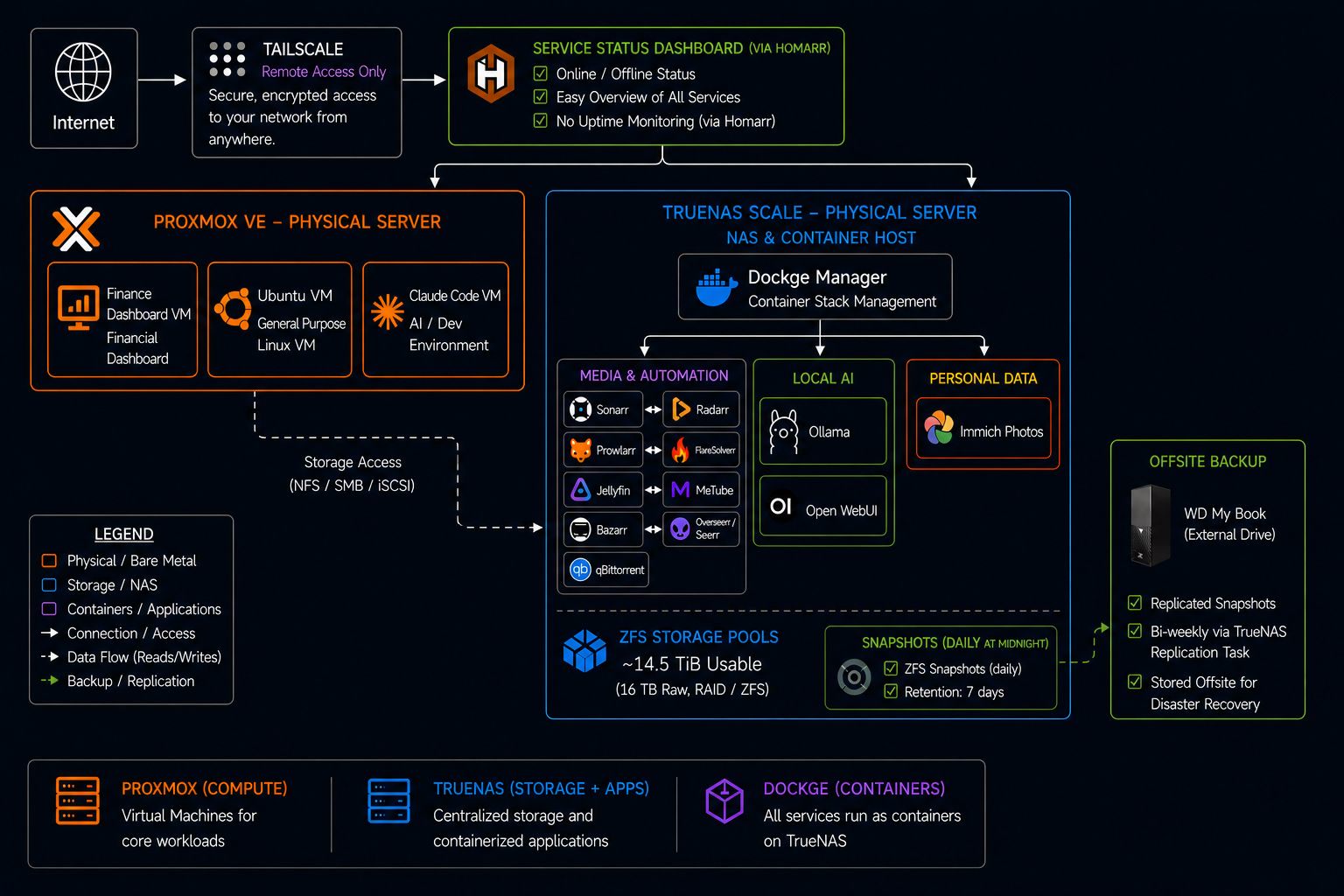
I have spent about 250 hrs working on this server on top of my full time job. That's the honest estimate. Hardware setup, late nights debugging storage configs, rebuilding things the "right way" after learning what the wrong way was, and slowly expanding the stack as each piece clicked into place. Every homelab looks clean in a diagram. The diagram comes after the chaos.
The Computers:
Proxmox VE
The foundation of the whole setup. Proxmox runs directly on bare metal and basically lets me run several computers inside one computer. Each virtual machine runs its own operating system, its own software, completely independent from the others.
Ubuntu VM
A Linux virtual machine I use for tinkering, scripting, and anything that doesn't need its own virtual machine. Early in my self-hosting journey, I broke my setup more than once by running scripts I didn't fully understand.
Claude Code VM
A virtual machine just for AI assisted app development or vibe coding. Keeping it separate means my experiments and dev work never interfere with my Proxmox Host, which hosts all my other virtual machines. If things go south, everything is contained and I can just delete the problematic VM.
Finance Dashboard VM
My personal finances, tracked on my own hardware. No third-party app gets to see my bank data. A self-hosted dashboard that gives me full control over what gets tracked and where it lives. I created this dashboard using Claude Code.
Storage & Backups:
TrueNas Scale
The second physical server serves as the backbone of my entire setup. It hosts all the applications and services running in containers in the diagram. My entire system runs through this machine, even Proxmox stores its disk drives on it.
Daily Snapshots:
Every night at midnight, the system takes an automatic snapshot of everything which is like screenshot. If I accidentally delete something, I can roll it back in seconds. These snapshots are kept for seven days. I learned this the hard way. For reference, I once ran a script that deleted everything, and I did not have snapshots.
Offsite Backup
An external hard drive I keep at a separate physical location. Every two weeks, my system automatically replicates the most important snapshots to it. If the house burns down, the data doesn't. This is the one piece of the setup that I hope I never have to use.
Access & Networking:
Tailscale
Lets me securely reach my home network from anywhere in the world, phone, laptop, wherever. No open ports, no complicated firewall rules. It just works, and it's encrypted end-to-end.
Homarr
My homepage. It's a single page that displays all my running services, indicating their online status, and provides quick links to each. It's the dashboard I use every morning. For me, all paths lead to Homarr; I no longer need to remember the LAN IPs for my applications – I simply use Homarr.
Media & Automation:
⚠️ Disclaimer
This guide is for educational purposes only. Only download content you have the legal right to access. Respect copyright laws in your jurisdiction. The author takes no responsibility for how this information is used.
*The Arr Stack:
- Sonarr: Manages shows, monitors, grabs, renames and organizes
- Radarr: Manages movies, monitors, grabs, renames, and organizes
- Prowlarr: Indexer manager that searches sites and integrates with Radarr and Sonarr
- qBittorrent: Download client that handles the actual downloads
- Bazarr: Subtitle manager that automatically finds and downloads subtitles
- Jellyfin: Streams your content to any device
- Seerr: Lets users request movies and shows, like an open-source Netflix connected to Jellyfin
Personal Data:
Immich
This is my replacement for Google Photos and Apple Photos. The app on my phone backs up every photo automatically, and Immich organizes them with the same smart features, including face recognition, search by what's in the photo, shared albums, and a beautiful timeline view. It does everything Google Photos does, but runs on hardware I own, and my data never leaves my house.
Was it worth it?
Honestly, yes. Not because it saved me money on day one (it didn't), and not because it was easy (it wasn't). But because I now have a setup that does exactly what I want, with no subscriptions creeping up, no terms of service changing overnight, and no company deciding to shut down the thing I depended on.
The hours put in were a one time investment. The feeling of opening Immich, knowing every picture is mine on hardware I control, backed up to a drive sitting somewhere safe. Yeah, that doesn't get old.